




Latest Insights
How to Conduct Usability Testing for AI Medical Scribe Applications
- Sep 28, 2026
- Sajid M.
- Usability Testing for AI Mecical Scribe Apps

A medical note can be accurate and well-structured yet still create friction during a busy consultation. For AI medical scribe applications, good usability means clinicians can capture conversations, review generated notes, correct mistakes, and finalize documentation without the technology becoming another distraction.
That makes usability testing an essential part of the overall QA strategy. At Testiva, our usability and QA testing services focus on realistic workflows to uncover confusing interactions, unnecessary steps, and AI behaviors that may slow users down. The goal is simple: determine whether the application works naturally in real clinical scenarios not just whether its features function as designed.
Why Usability Testing for AI Medical Scribes Is Different
Traditional usability testing often asks whether users can understand an interface and complete specific tasks efficiently. AI medical scribes introduce another variable: users are interacting not only with an interface but also with probabilistic AI-generated output.
A clinician might understand every button perfectly and still dislike the product because reviewing its notes takes too long. Similarly, an application might generate highly accurate text overall while occasionally misrepresenting medication instructions, negation, symptoms, or speaker attribution. Those failures can disproportionately affect user trust.
Usability testing therefore needs to examine the complete experience: starting a session, capturing a conversation, generating documentation, reviewing the output, making corrections, approving the note, and moving to the next patient. The goal is not simply to prove that the software “works.” It is to determine whether it works naturally and predictably within the clinical workflow.
Start With Real Clinical Workflows, Not Generic Test Cases
A strong usability test begins by mapping how clinicians actually use the product. Medical encounters are rarely clean, linear conversations. Patients interrupt. Family members contribute information. Clinicians move between examination and discussion. Medical terminology, abbreviations, numbers, drug names, and unrelated conversation can appear within minutes.
Test scenarios should reproduce that complexity rather than relying exclusively on perfectly scripted conversations. A realistic scenario might involve a patient describing several symptoms while the clinician asks follow-up questions, corrects an earlier statement, discusses a medication dosage, and then explains the treatment plan.
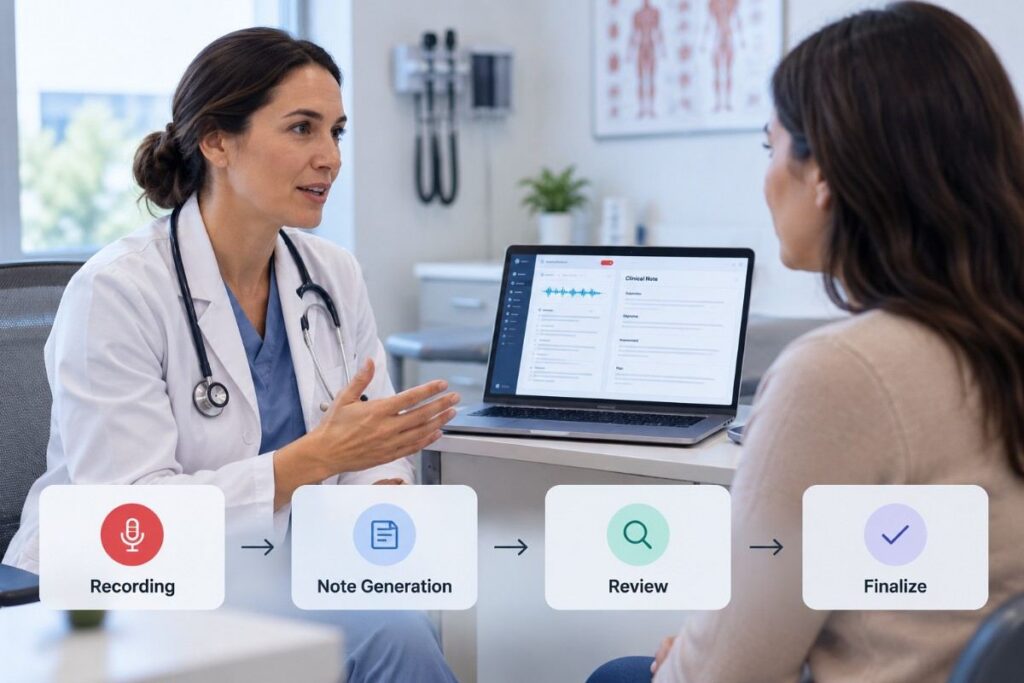
We recommend mapping the workflow from beginning to end and identifying the moments where friction would be most expensive. Pay particular attention to session initiation, recording state, patient-context selection, note generation, editing, regeneration, approval, export, and integration with downstream systems.
This exposes an important category of defects: individually functional features that become frustrating when used together.
Define Usability Metrics Before Testing
“Easy to use” is too vague to be a useful acceptance criterion. Usability testing becomes much more actionable when teams establish measurable indicators before sessions begin.
Task completion rate is a good starting point. Can clinicians successfully begin recording, generate a note, locate an incorrect statement, edit it, and finalize the documentation without assistance? Time on task adds another dimension because a workflow that technically succeeds but takes six minutes instead of two may undermine the product’s core value proposition.
Error rate should also be measured. Track incorrect selections, abandoned actions, accidental recordings, unnecessary navigation, repeated corrections, and situations where participants need moderator assistance. For AI-generated notes, measure correction burden as well: how much work does the clinician perform before considering the note usable?
Finally, capture subjective measures such as confidence, perceived workload, satisfaction, and trust. Two outputs with similar accuracy scores can produce very different experiences if one makes its uncertainty clearer and is easier to verify.
Recruit Participants Who Reflect Actual Users
Testing exclusively with developers, QA engineers, or internal employees creates an unrealistically forgiving environment. These participants already understand the product’s logic and often know what the interface intends to do.
For meaningful findings, include representative users such as physicians, nurses, clinical documentation specialists, or other intended healthcare professionals. Participant selection should also account for specialty and working context where relevant. Documentation patterns in primary care can differ significantly from those in psychiatry, cardiology, emergency medicine, or other specialties.
Experience with AI tools matters too. An enthusiastic early adopter may tolerate behaviors that frustrate someone using an AI scribe for the first time. Including participants with different levels of technical confidence helps reveal whether the application is genuinely intuitive or merely intuitive to people already familiar with AI products.
Test the Entire Scribing Journey
Usability testing should follow the lifecycle of an encounter rather than isolating individual screens. Begin with setup. Can the user quickly identify the correct patient or encounter, understand whether recording has started, and recover confidently if something goes wrong?
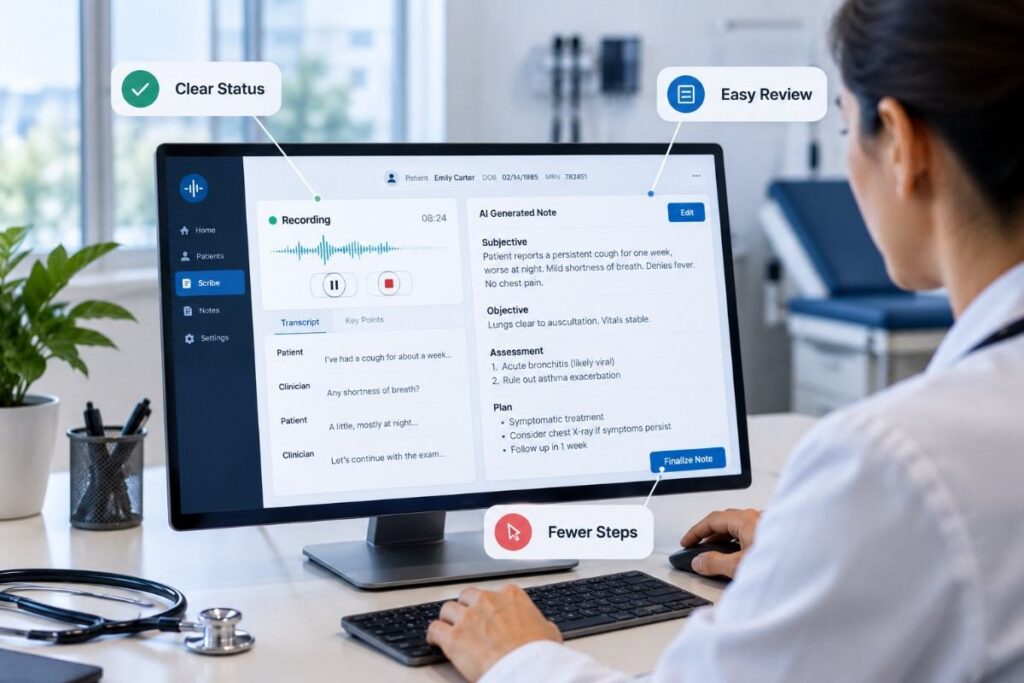
Next, observe the capture experience. Recording indicators should be unmistakable without becoming distracting. Users should understand whether the system is listening, paused, processing, or experiencing a problem. Ambiguous system states are particularly dangerous in products designed to operate quietly in the background.
Then examine note generation and review. Can clinicians quickly distinguish relevant clinical information from noise? Are sections organized in the way users expect? Can they spot questionable output without rereading an entire document?
Finally, test correction and completion. Editing a generated note should not feel like fighting the AI. Users need efficient ways to modify content, restore accidentally removed information, and understand what will happen when they regenerate or finalize documentation.
Put AI Errors Into the Usability Test
A common testing mistake is evaluating usability only when the AI behaves perfectly. Real-world usability often becomes visible precisely when the model does not.
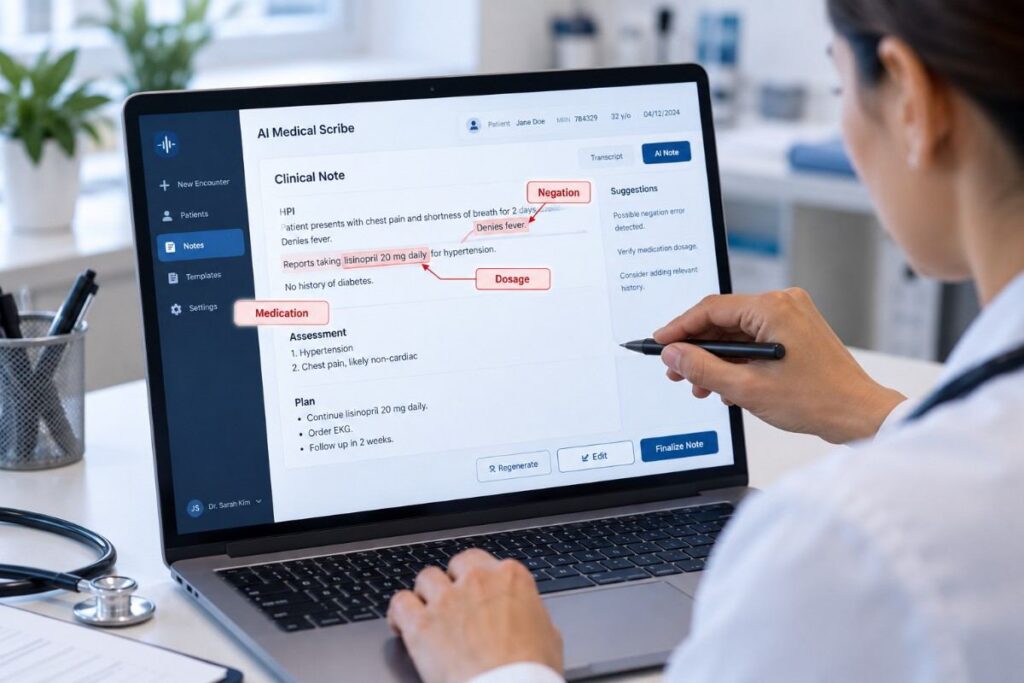
Deliberately test difficult inputs: accents, overlapping speech, background noise, uncommon medical terminology, similar-sounding drug names, numerical values, corrections made during conversation, and clinically important negation. “The patient has chest pain” and “the patient has no chest pain” differ by one tiny word and an enormous amount of meaning.
The usability question is not merely whether an error occurs. It is whether the clinician can recognize and correct it efficiently.
Test how the interface communicates uncertain or incomplete information. If confidence indicators, warnings, source references, or transcript-to-note traceability are available, determine whether clinicians actually understand and use them. A clever AI feature has little value if users cannot interpret its signals under time pressure.
Evaluate Trust Without Encouraging Blind Trust
Trust is one of the trickiest dimensions of AI medical scribe usability. Too little trust forces clinicians to manually verify everything, reducing efficiency. Too much trust can cause users to approve inaccurate output without sufficient review.
Usability testing should investigate whether the interface supports appropriate trust. Ask participants what they would verify before approving a note, which types of content make them cautious, and what causes them to question the AI’s output.
Observe behavior rather than relying solely on interviews. A participant may claim they carefully review every note but rapidly approve generated content during task-based testing. That difference between stated and observed behavior is valuable product evidence.
The ideal experience makes verification efficient without implying that generated documentation is infallible.
Test Accessibility and Cognitive Load
Clinical software competes for attention with patients, medical decisions, alerts, EHR systems, and countless administrative demands. Every unnecessary click or confusing state adds cognitive load.
Evaluate information hierarchy, readability, keyboard navigation, focus behavior, contrast, responsive layouts, error messaging, and interaction consistency. Accessibility should be incorporated into usability testing rather than treated as a final compliance exercise.
Also watch for “micro-friction.” A single extra click may look harmless in a test case, but repeated across 20 or 30 encounters per day it becomes meaningful. Small delays, repeated confirmations, excessive scrolling, or poorly positioned controls can collectively determine whether clinicians embrace or abandon a tool.
Run Moderated Sessions and Observe Behavior
Moderated usability sessions are particularly useful for AI medical scribes because testers can observe both interaction and reasoning. Give participants realistic goals without explaining exactly how to accomplish them. If the moderator has to repeatedly tell users where to click, the test is evaluating their ability to follow instructions rather than the product’s usability.
Encourage participants to think aloud when practical. Comments such as “I expected this to save automatically” or “I’m not sure whether it is still recording” reveal mismatches between the application’s design and the user’s mental model.
Record interaction data where appropriate and permitted, including task duration, navigation paths, errors, hesitation, corrections, and abandonment. Combine those observations with post-task questions instead of relying on satisfaction scores alone.
Prioritize Findings by Clinical and Workflow Impact
Not every usability problem deserves the same priority. A slightly confusing icon and an unclear recording state are both usability issues, but their consequences are very different.
We recommend prioritizing findings using severity, frequency, recoverability, and workflow impact. For AI-generated documentation, add the potential consequence of misunderstanding or overlooking incorrect content. Issues affecting clinical meaning, data handling, session status, or note approval should receive particularly careful attention.
Patterns matter more than isolated complaints. If several clinicians hesitate at the same step, repeatedly correct the same type of output, or misunderstand the same AI behavior, the problem is probably systemic rather than personal preference.
Treat Usability Testing as an Ongoing QA Process
AI medical scribe applications evolve continuously. Model changes can improve transcription accuracy while unexpectedly changing note structure. New prompts can alter summarization behavior. UI updates can make verification easier or accidentally hide information clinicians previously relied upon.
Usability testing should therefore continue alongside functional, integration, regression, performance, and AI-focused testing. After significant model or workflow changes, rerun high-value scenarios and compare usability metrics against established baselines.
The strongest QA strategy connects technical quality with human experience. An AI medical scribe succeeds when clinicians can use it quickly, understand what it is doing, identify problems, recover from errors, and confidently complete documentation without adding unnecessary cognitive work.
For teams building or scaling AI medical scribe applications, that is the standard worth testing against. Unlock flawless delivery by making real clinical usability a measurable part of your QA strategy not an assumption made after the product ships.