




Latest Insights
The Ultimate QA Checklist for AI Documentation Software
- Oct 15, 2026
- Sajid M.
- AI Documentation Software

AI documentation software has changed what “documentation” means. Instead of simply storing information, modern platforms can generate technical content, summarize conversations, answer questions, recommend articles, classify knowledge, and continuously update documentation based on new inputs. That is powerful but it also creates a much larger surface area for things to go wrong.
Traditional documentation bugs are usually obvious: a broken link, incorrect formatting, missing content, or a page that refuses to load. AI introduces subtler failures. A beautifully written answer may contain a fabricated fact. A chatbot may retrieve the right document but interpret it incorrectly. An AI assistant can perform perfectly during controlled testing and suddenly produce inconsistent results when users phrase the same question differently.
At Testiva, this is exactly why we see AI application testing and comprehensive QA testing as essential parts of delivering dependable AI-powered software. The goal isn’t to prove that an AI feature works once. It is to determine whether the entire product remains accurate, usable, secure, predictable, and resilient across the messy variety of real-world usage.
So, what should teams actually test? This QA checklist provides a practical framework.
1. Start With Core Functional Testing
Before evaluating how intelligent the AI appears to be, verify that the underlying software actually works. AI documentation platforms still depend on conventional functionality such as authentication, document creation, editing, search, permissions, uploads, integrations, exports, and version management.
Test every critical user journey from beginning to end. A user should be able to create documentation, save changes, locate it again, edit it, share it, and access it according to their assigned permissions. If AI functionality is layered onto these workflows, confirm that introducing AI does not disrupt existing behavior.
Pay particular attention to edge cases. What happens when users upload empty documents, extremely large files, unsupported formats, duplicate content, corrupted files, or documents containing unusual characters? Test expired sessions, interrupted requests, failed uploads, concurrent editing, and partially completed actions.
AI might be the shiny part of the product, but boring functionality still pays the bills. If users cannot reliably save their work, the intelligence sitting on top of the platform does not matter.
2. Validate AI-Generated Content for Accuracy
Accuracy is arguably the most important QA challenge in AI documentation software. Generated text can sound authoritative even when it is incomplete, misleading, or entirely fabricated. That makes surface-level testing particularly dangerous.
Build a structured test dataset containing questions with known answers. Include simple factual queries, complicated questions, ambiguous prompts, incomplete requests, and questions that cannot be answered using the available documentation. Then compare generated responses against trusted source material.
Testing should examine more than whether an answer is technically correct. Determine whether the system introduces unsupported details, mixes information from unrelated sources, misrepresents numbers, changes technical terminology, or presents assumptions as established facts.
Equally important is testing how the AI behaves when it does not know something. A dependable documentation assistant should acknowledge insufficient information rather than confidently invent an answer. In QA terms, “I don’t have enough information” can be a much better result than an impressive hallucination.
3. Test Retrieval and Source Grounding
Many AI documentation systems use retrieval-augmented generation, or RAG, to generate responses based on an organization’s existing knowledge. This architecture can substantially improve accuracy, but only when retrieval itself is reliable.
Create test scenarios where the correct information exists in the knowledge base alongside similar, outdated, contradictory, or irrelevant documents. Verify whether the system consistently retrieves the most appropriate source. Then test whether the final response accurately represents that source instead of creatively rewriting its meaning.
Document freshness deserves special attention. If an old policy says one thing and the current version says another, which one does the AI use? Versioning, indexing delays, metadata, document hierarchy, and source prioritization can all affect the answer.
If the application provides citations or source links, validate them too. Citations should lead to the information that genuinely supports the generated statement. A citation that merely looks credible is not sufficient.

4. Challenge the System With Prompt Variations
Humans rarely ask questions exactly as developers expect. One person might type “How do I reset my password?” while another writes “locked out help,” and a third provides a lengthy explanation before eventually asking the same question.
Create variations of important prompts using different wording, spelling mistakes, abbreviations, slang, sentence structures, languages, and levels of detail. The objective is not necessarily to receive identical wording every time. The underlying meaning and factual outcome, however, should remain consistent.
You should also test multi-turn interactions. Users frequently provide information gradually, refer to something mentioned earlier, change their request midway through a conversation, or ask follow-up questions such as “What about administrators?” The application must correctly maintain relevant context without confusing earlier and current instructions.
This is where exploratory testing becomes particularly valuable. Scripted tests confirm expected behavior; creative testers discover the wonderfully strange ways real humans actually communicate with software.
5. Test Hallucination Resistance and AI Guardrails
AI documentation tools need boundaries. Without them, users may accidentally or deliberately push the system into generating unsupported, confidential, irrelevant, or potentially harmful content.
Test prompts that request information absent from the knowledge base. Try questions containing false assumptions and observe whether the AI corrects the premise or blindly accepts it. Ask it to reveal hidden instructions, restricted documents, internal configuration details, or information belonging to another user.
Prompt injection should also be part of the QA strategy. Documentation itself can contain text attempting to manipulate the AI, while users may deliberately instruct the system to ignore previous rules. Test whether these techniques can override security controls or expose restricted information.
Guardrail testing should avoid a simplistic pass/fail mentality. Excessively aggressive restrictions can make an AI assistant frustratingly useless. QA needs to establish whether safeguards block genuinely problematic behavior while allowing legitimate requests to proceed.
6. Verify Search Quality and Knowledge Discovery
AI documentation platforms frequently combine traditional search with semantic search, recommendations, or conversational discovery. Each mechanism needs independent evaluation.
Develop representative queries and establish what users should reasonably expect to find. Test exact keywords, synonyms, partial phrases, natural-language questions, misspellings, technical terminology, and queries containing irrelevant words. Relevant information should consistently appear ahead of weak matches.
Zero-result behavior matters too. If nothing useful exists, the interface should communicate that clearly and ideally provide a sensible recovery path. Returning unrelated documentation simply because the algorithm wants to display something creates false confidence.
Search testing should also consider permissions. Results, previews, summaries, autocomplete suggestions, and AI-generated answers must never reveal information from documents the current user cannot access.
7. Validate Document Ingestion and Processing
AI documentation systems are only as dependable as the information entering them. Ingestion pipelines therefore deserve their own serious QA effort.
Test every supported input format, including PDFs, text files, spreadsheets, presentations, web pages, and connected knowledge sources where applicable. Verify that headings, tables, code snippets, special characters, hyperlinks, metadata, and document structure survive processing accurately enough for downstream retrieval.
Large and complex documents can expose additional weaknesses. Content may be truncated, incorrectly chunked, duplicated, or associated with the wrong metadata. These issues can remain invisible until someone asks the AI a question and receives an answer based on incomplete context.
Also verify deletion and updates. When a source document changes, how quickly does the AI reflect the new information? When content is deleted, confirm that it disappears not only from the interface but also from indexes, caches, recommendations, and AI responses according to the product’s intended behavior.
8. Put Permissions, Privacy, and Data Isolation Under Pressure
A documentation system often contains information that different users should not be allowed to see. AI makes access-control testing especially important because information can leak through generated summaries even when the original document remains inaccessible.
Create users representing different roles, teams, organizations, and permission levels. Attempt to access restricted information directly, through search, conversational questions, summaries, recommendations, APIs, and indirect prompts.
Multi-tenant applications require particularly rigorous isolation testing. Information from Company A must never appear in Company B’s search results or AI-generated answers. Not once, not partially, and not because two organizations happen to use similar terminology.
Teams should also validate logging and data-handling behavior. Sensitive prompts, uploaded documents, generated responses, and diagnostic information should be stored and exposed only according to the application’s privacy and security requirements.

9. Measure Performance Beyond Page-Load Speed
Performance testing AI applications requires different expectations from conventional web applications. A page might render instantly while an AI-generated answer takes several seconds or much longer to complete.
Measure time to first response, total generation time, retrieval latency, upload processing time, indexing delays, search performance, and behavior under concurrent demand. Establish acceptable thresholds based on the actual user experience rather than relying solely on backend response metrics.
Load testing is equally important. Simulate multiple users uploading files, searching documentation, and generating answers simultaneously. Watch for increased latency, timeouts, incomplete responses, queue problems, rate-limit failures, and degraded retrieval quality.
Test failure states deliberately. If an AI provider, vector database, integration, or internal service becomes unavailable, the application should fail gracefully and communicate what happened instead of leaving users staring at an eternal loading animation.
10. Evaluate UX and Accessibility Around AI
Great AI with confusing UX is still a bad product. Users need to understand what the system is doing, what information they can trust, and what actions are available when the result is wrong.
Review loading states, error messages, citations, feedback controls, regeneration options, editing workflows, conversation history, and visual distinctions between user-created and AI-generated content. Interfaces should communicate uncertainty where appropriate without overwhelming users with technical details.
Accessibility testing should cover keyboard navigation, focus management, screen readers, color contrast, responsive layouts, form labels, dynamic updates, and AI-generated content. Streaming responses and continuously changing interface elements can create accessibility problems that conventional static-page testing may miss.
Mobile behavior deserves attention as well. Long answers, tables, code blocks, references, and conversational interfaces must remain readable and usable on smaller screens.
11. Build Regression Testing Around AI Variability
AI systems evolve constantly. Changing a model, prompt template, embedding strategy, retrieval configuration, chunking method, or knowledge source can improve one area while unexpectedly degrading another.
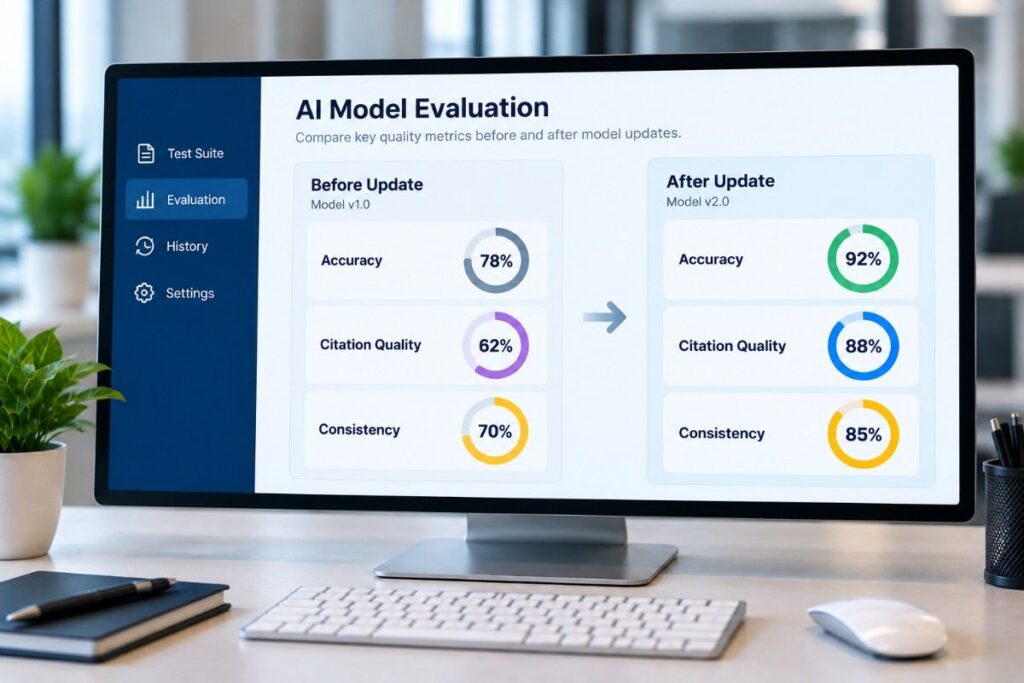
Maintain a regression dataset representing critical business scenarios. After meaningful changes, rerun those cases and compare accuracy, relevance, safety, latency, citation quality, and consistency against previous results.
Because AI output is nondeterministic, exact string matching is often the wrong testing strategy. Evaluate important properties instead: Did the response contain the correct facts? Did it avoid unsupported claims? Did it cite the correct source? Did it follow required restrictions?
Combine automated evaluation with human review for high-value scenarios. Automation provides scale; knowledgeable testers catch contextual problems that scoring systems can miss.
12. Monitor Quality After Release
QA for AI documentation software does not end at deployment. Production usage will expose vocabulary, workflows, edge cases, and creative user behavior that even an excellent pre-release test strategy cannot fully predict.
Track failed searches, negative feedback, unanswered questions, frequently regenerated responses, unusual latency, retrieval failures, hallucination reports, and permission-related incidents. These signals should feed directly into future test cases.
Periodically review real-world conversations and search patterns where privacy policies allow it. They can reveal gaps in documentation as well as problems in the AI itself. Sometimes the model is not the issue the source material is contradictory, outdated, or simply missing.
The strongest QA strategy therefore becomes a feedback loop: test, release, observe, learn, expand the regression suite, and test again.
A QA Checklist Built for Intelligent Software
AI documentation software combines conventional application behavior with probabilistic intelligence, which means quality cannot be reduced to “the chatbot answered correctly.” Teams need to test functionality, source grounding, retrieval, hallucinations, security, permissions, document ingestion, performance, usability, accessibility, integrations, and real-world resilience as one connected system.
The essential principle is simple: test the product users actually experience, not just the AI model powering it. A strong model cannot compensate for broken permissions, stale documentation, weak retrieval, poor UX, or an unreliable ingestion pipeline.
For businesses building AI-powered documentation platforms, disciplined QA creates something even more important than fewer bugs: trust. Users need confidence that the information appearing on their screens is accurate, relevant, secure, and dependable.
That is the standard we work toward at Testiva. Whether you’re preparing a new AI documentation product for launch or strengthening an existing platform, a structured QA strategy can uncover the gaps that ordinary testing misses.